


Say goodbye to frequency setting troubles!
Kanglong KL-T80 one-key frequency matching — even beginners can build a network in seconds.
1. Do you often face these troubles in daily work?
Property patrols, construction sites, mall security, fleet travel...Walkie-talkies have become essential communication tools for all industries.However, different frequency settings always bring a lot of hassle.
Manual frequency input, CTCSS code checking, and complicated professional parameters confuse new users for a long time.The traditional method is time-consuming and low-efficiency.When adding new devices temporarily or organizing cross-team groups, pairing is impossible without a computer and programming cable.
These troublesome frequency-setting problems greatly slow down your work efficiency every day.
2. Kanglong KL-T80 Analog Radio — One-key frequency matching solves all difficulties
No professional skills required, no computer or programming cable needed.Equipped with intelligent one-key frequency copying technology, it completely eliminates complicated traditional operation barriers.
• Built-in high-precision data transmission chip, fully synchronizes frequency, CTCSS tone, bandwidth and all channel parameters;
• Short-distance wireless automatic pairing, no complex operations. Easy for new users and seniors to master quickly;
• Fully compatible with all analog radio scenarios. Strong anti-interference and high pairing accuracy, avoiding common issues like cross-talk, no sound and communication failure.
Perfect for daily duty, noisy construction sites and high-intensity fleet outdoor use. Make network grouping simple and hassle-free forever.
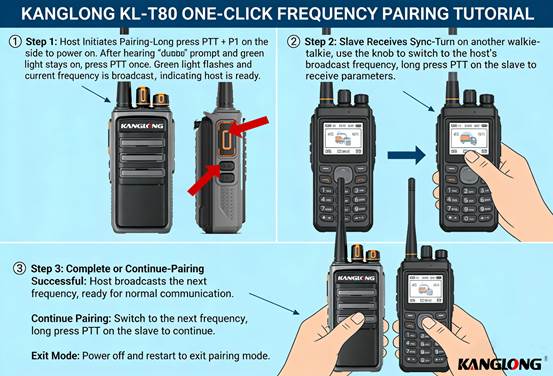
2. Super easy operation guide — Master one-key pairing in 3 minutes
Step 1: Set the master radio for pairing
Turn the master radio to Channel 1 and power it off.Press and hold the PTT + P1 keys while powering on. You will hear two beeps and the green light stays steady.Press the PTT once; the green light flashes, and the radio enters pairing mode with automatic channel voice announcement.
Step 2: Operate the slave radios
Power on the slave radios and switch to the target channel. Press and hold the PTT key to wait for synchronization.
Step 3: Finish or continue pairing
✅ When the master radio announces the next channel, pairing succeeds. You may continue matching other channels: switch the slave radio channel and hold PTT to repeat the steps above.
❌ Exit pairing mode: Power off and restart the master radio directly.
3. Full-featured & Practical Design, Bringing Great Convenience to Daily Work
✅ No skills required for everyoneAbandon complicated professional settings. Easy for all staff to operate and reduce learning costs.
✅ Emergency fast networkingAdd new devices or form temporary teams anytime, anywhere. Frequency matching without computers or professional tools.
✅ Efficient batch configurationSynchronize multiple radios for engineering and security teams in one go, greatly saving manual debugging time.
✅ Stable & secure communicationAccurate parameter synchronization eliminates cross-talk and noise, protecting your work communication privacy.
✅ Wide compatibility for all scenariosStable and durable all day long for construction sites, property management, shopping malls, fleets, event security and more.
One Kanglong KL-T80 analog two-way radio solves all frequency-setting pain points with one-key cloning technology. Make team communication more efficient and daily work worry-free!
 English
 عربي
عربي Русский
 Français
 Español
 Deutsch